Technology and integration
Standards in, standards out. Nothing proprietary on the door.
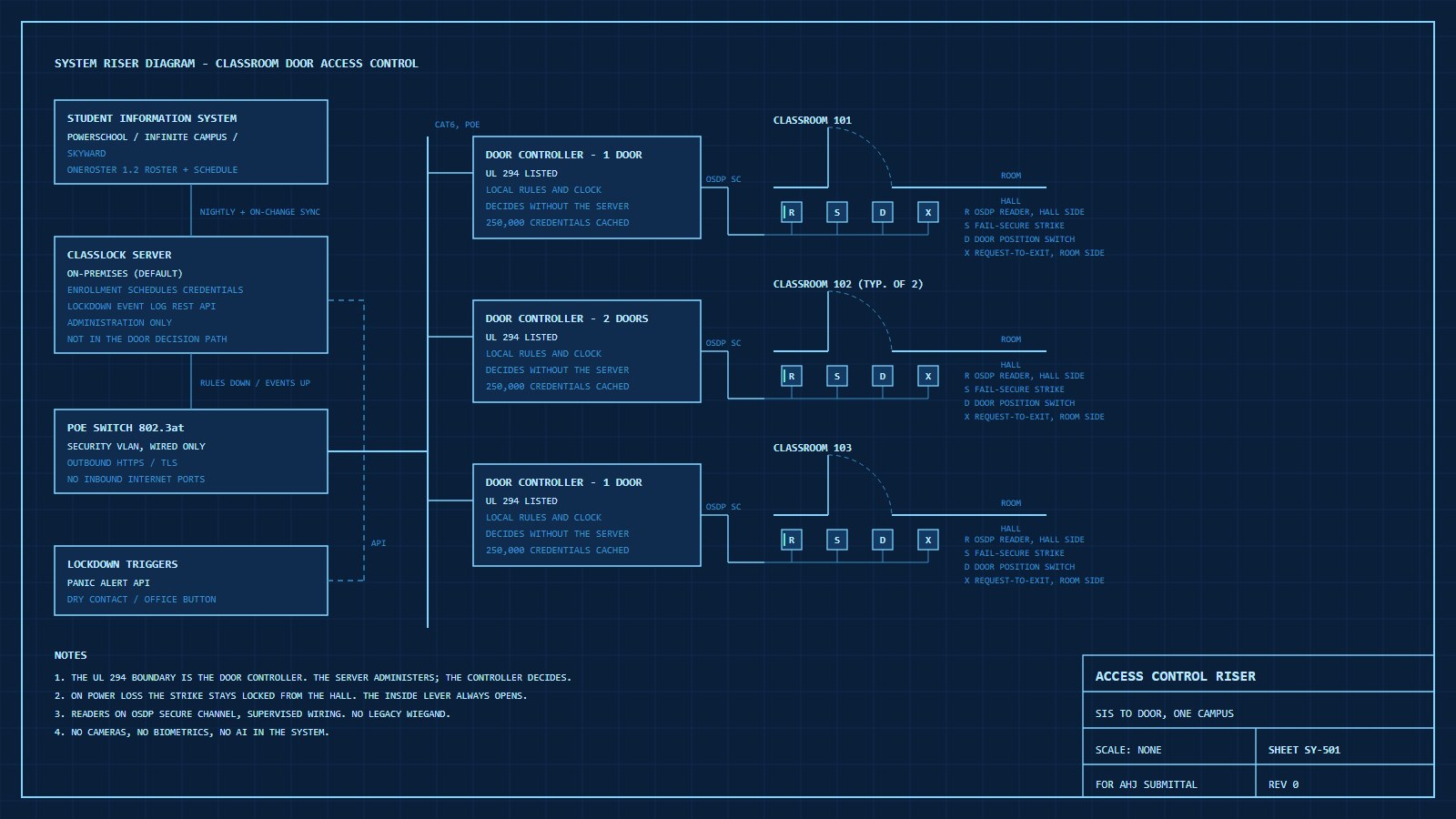
ClassLock is a policy layer. It reads schedules from the student information system you already run, pushes rules to UL 294 listed door controllers that decide locally, and reports back. For IT directors, facilities engineers and privacy officers, this page is the detail. The schedule‑aware access method is patent pending: a U.S. non‑provisional application filed in September 2025.
Architecture
Central policy. Decision at the door.
Why the decision lives at the door
Each Axis controller stores the credential list, the access rules and its own clock, and "can internally handle all tasks related to door access, even if the network is down." It holds 250,000 credentials and 250,000 events locally. When a badge is presented the controller answers in milliseconds without asking the server. ClassLock syncs rule changes, revocations and lockdown commands to the controllers and subscribes to their event stream.
This is the same architecture used by every major commercial access‑control platform, and it is why the UL 294 listing on the controller is the one that matters: the certified device performs the security function. The server software performs administration.
Network
- Controllers on a dedicated security VLAN, PoE 802.3at, wired only.
- Outbound HTTPS from controllers to the ClassLock server; no inbound ports from the internet.
- Readers on OSDP Secure Channel (AES‑128, supervised wiring), not legacy Wiegand.
- Signed firmware, secure boot and a 5‑year hardware warranty on the controllers.
- On‑premises server by default. District‑controlled cloud sync is optional for multi‑campus dashboards.
Credentials
An encrypted ID badge first. Everything else is a fallback.
ClassLock's primary credential is an encrypted 13.56 MHz smart card, usually the student ID the school already prints. Every door gets a multi‑technology reader, so a district can start with the cards it has and move up without touching the door again.
| Credential | Strengths | Limits | Role in ClassLock |
|---|---|---|---|
| Encrypted smart card 13.56 MHz, such as MIFARE DESFire EV3 | Encrypted exchange between card and reader, completed in milliseconds. No battery and no phone. | Can be lost or forgotten. Handled by disable, re‑issue and temporary badges. | Primary for students, staff, substitutes and visitors. Standard on every door. |
| Legacy proximity card 125 kHz | Already in use in many districts. No re‑badging on day one. | No encryption. Can be copied with inexpensive tools. | Read during migration. ClassLock does not issue new ones. |
| Mobile credential NFC or Bluetooth | Nothing to print. Revoked instantly. | 77% of public schools prohibit phone use during class, and 38 states plus D.C. require districts to ban or restrict student phones. Batteries run down. Phone‑wallet student IDs are a college program today, not K‑12. | Optional for staff. The readers are ready if student use becomes practical. |
| Keypad PIN | Nothing to carry. | PINs get shared and watched. Slow at a busy door. | Optional second factor for staff on selected doors. Never the only credential. |
Not used: QR codes and biometrics. A QR code can be photographed and passed along, and reading one takes a camera at the door. ClassLock puts no cameras on doors and collects no faces or fingerprints.
Lost, forgotten, expired
The office disables a lost badge and every door rejects it within seconds. A re‑issued badge keeps the person's permissions and retires the old card. A student who forgot a badge gets a temporary one for the day, or is admitted by the teacher as today.
Substitutes, visitors, younger students
Substitutes and visitors get a temporary badge limited to the rooms and periods they need, expiring at dismissal. In early grades, schools commonly run doors on the teacher's badge and the bell schedule; a wristband or fob carrying the same chip is an option.
Keys the district owns
The reader authenticates the card's encrypted credential, not its printed number or serial. Cards are encoded with a custom key the district owns, on the open MIFARE DESFire platform, so cards and readers can come from more than one vendor.
Reader models, card formats and key management are covered in the technical review. Sources: card speed and encryption, NXP MIFARE DESFire EV3 and Allegion custom key Q&A; phone rules, NCES School Pulse Panel (Dec 2024) and Husch Blackwell (as of June 2026); phone‑wallet student IDs, Apple; district‑owned keys and multi‑vendor cards, LEAF Community; fob and wristband forms, Gallagher and KSI. Keypad and badge costs are on the pricing page.
Schedule integration
Connects to the scheduling software your district already runs
The three largest district SIS platforms, PowerSchool, Infinite Campus and Skyward, are all certified providers of the 1EdTech OneRoster standard. One standards‑based connector reaches all of them, and Clever and ClassLink re‑expose nearly every other SIS the same way.
What ClassLock reads
- People: students and staff, with role.
- Sections and enrollments: who is in which class.
- Class periods and rooms: OneRoster carries the period slots and the room for every section.
- Terms and calendar.
That is all. No grades, no discipline, no health, no addresses, no Social Security numbers.
Bell times
OneRoster carries period labels, not clock times. Ed‑Fi's Bell Schedule domain does carry start and end times, including late‑start and testing‑day schedules. ClassLock reads them where available and otherwise keeps a per‑school bell table that the office edits in minutes. The schedule source is configured per installation: SIS, ClassLock‑native, or hybrid.
Sync and exceptions
Nightly sync plus on‑demand. Schedule changes, new enrollments and withdrawals flow through automatically. Substitutes, aides, therapists and visitors get time‑boxed credentials issued from the dashboard. Grace periods and passing‑period unlock windows are policy settings, not code.
| Platform | Share of U.S. districts | Rostering path | ClassLock status |
|---|---|---|---|
| PowerSchool SIS | About 23% of identified implementations | OneRoster 1.1/1.2 certified; Ed‑Fi certified; PowerSchool API | Adapter in pilot (MVP) |
| Infinite Campus | About 10%; 3,200+ districts | OneRoster 1.1/1.2 (OAuth 2); Ed‑Fi | Phase 2 adapter |
| Skyward | About 7%; 1,900+ districts | OneRoster certified | Phase 2 adapter |
| Aeries, Synergy, FACTS, Focus, others | Remainder | OneRoster, Clever Secure Sync, ClassLink OneSync, or scheduled CSV | Standards path |
Market share: ListEdTech, The 2025 K‑12 SIS Market. Certifications: 1EdTech, Infinite Campus, Skyward.
Privacy
No cameras. No biometrics. The minimum data, held by the district.
The U.S. Department of Education tells school vendors to "only request or collect the minimum amount of PII that is needed to complete the assigned task." ClassLock's task is to decide whether a credential may open a door, so it holds a name, a role, a credential number and section enrollments. The December 2024 PowerSchool breach exposed Social Security numbers, dates of birth and medical alerts from the SIS. A door system does not need any of those fields, and ClassLock never imports them.
FERPA defines biometric records as fingerprints, retina and iris patterns, voiceprints, DNA, facial characteristics and handwriting. ClassLock collects none of them. New York banned facial recognition in schools in 2023 and requires local review before any other biometric technology; ClassLock is unaffected because it uses none.
Door‑event logs tied to a student are education records. ClassLock holds them under FERPA's school‑official exception, under a district contract, with role‑based access, configurable retention and export on request. The district owns the data.
ED Privacy Technical Assistance Center vendor FAQ · 34 CFR 99.3 · NYSED 2023 determination · PowerSchool incident page
What ClassLock stores
| Person | Name, role, SIS identifier |
| Credential | Card or token number, status, expiry |
| Schedule | Section, room, period, term |
| Events | Door, time, credential, result, reason |
What ClassLock never stores
- Video, audio or images
- Faces, fingerprints or any biometric
- Grades, discipline, health or IEP data
- Addresses, Social Security numbers, dates of birth
- Location outside of door events
Contrast with camera‑based AI. AI gun‑detection systems analyze every camera feed continuously, and the ACLU has documented cameras present at 8 of the 10 deadliest school shootings with no measurable effect on outcomes. ClassLock changes what a door does, not what a camera sees. Compare approaches.
Reliability
Built from parts rated in the millions of cycles
- Grade 1 fail‑secure electric strikes are endurance‑tested to 1,000,000 cycles.
- Schlage ND Grade 1 levers show "nearly zero droop or wobble after 16 million cycles."
- Controllers keep working through network loss with a full local credential cache; events queue and sync when the link returns.
- Power loss: the strike stays locked from the hallway; the lever exits. No battery is required for safety, and PoE switches with UPS keep normal operation through short outages.
Co‑exists with what you have
A layer, not a rip‑and‑replace
- Exterior access control (Genetec, Avigilon, LenelS2, Brivo): stays. ClassLock runs the classroom doors and shares events.
- Panic alert (Centegix, Raptor and others): an alert can trigger a ClassLock lockdown through the API or a dry contact.
- Visitor management: visitor passes can be issued as time‑boxed ClassLock credentials.
- Fire alarm: no interface required for fail‑secure strikes with mechanical egress.
- PA and intercom: unchanged. Late arrivals without a badge can be admitted by intercom and remote unlock, as some districts already do.
API
REST over HTTPS with token authentication and a server‑sent event stream. Endpoints cover doors, lockdown, drills, users and credentials, including register, disable and re‑issue. Auto‑disable rules handle lost badges, repeated denials and expiry.
Questions from security consultants
What access‑control professionals ask first
A physical security consultant reviewed this site and sent seven questions. They are the ones an integrator, an IT director or a district's security advisor will ask, so here are the answers in full, including what is not built yet.
Why install ClassLock instead of extending our existing access‑control system to classroom doors?
The policy. Conventional platforms model access as cardholder groups and door schedules. A classroom is different: thousands of individual students, each allowed into one room only during the periods they are enrolled there, changing every term, with grace windows around each period and exceptions for substitutes, aides, therapists and late arrivals. ClassLock compiles that policy every night from the SIS roster and the bell schedule and pushes it to the door controllers. Maintaining it by hand at classroom scale is the job nobody does, which is why classroom doors still run on mechanical keys and doorstops. The schedule‑aware method is patent pending.
Lockdown confirmation. A door shows as secured only when the controller has confirmed its lock state and the door position switch confirms it is closed. A door that was commanded but has not confirmed shows as unconfirmed, and an offline or tampered door shows as unknown, never green. Every drill produces a door‑by‑door report.
Cost and certification at classroom scale. ClassLock standardizes on UL 294 listed Axis controllers that make the grant or deny decision locally. The server is never in the path from card to strike, so it stays outside the UL 294 scope, and the per‑door cost is built for a district with 400 classroom doors, not 12 exterior ones.
Could the roster and schedule functions integrate with the access‑control platform we already own?
In principle, yes. The value is in the software; the reader, strike, door position switch and request‑to‑exit sensor are catalog parts. ClassLock runs on Axis controllers today because Axis lets lockdown be set on the controller itself, so a lockdown holds even if every server then goes down. Axis controllers are also native devices in Genetec Security Center, which makes coexistence with a Genetec perimeter straightforward.
Pushing per‑period rules into Genetec, LenelS2, Avigilon or Brivo as native access levels would need an adapter for each platform, and depends on how well each tolerates thousands of frequently changing individual schedules. That is on the roadmap as an open question. Today the model is coexistence: the perimeter stays on your system, ClassLock runs the classroom doors, lockdown triggers arrive from panic‑alert or visitor‑management systems by API or dry contact, and door events flow out over MQTT or syslog to your SIEM or video system.
Are classroom doors locked all day, or unlocked during passing periods?
Each school chooses, in the dashboard rather than in code. The default is locked, opening for anyone on that period's roster. A school can instead unlock doors on a timer for the first few minutes of each passing period and relock when class begins, or run credential‑only all day. A lockdown suspends every scheduled unlock until it is released, and the inside lever always opens the door.
On throughput: the smart‑card exchange takes milliseconds, and classroom badge readers used for attendance handle up to 25 students a minute. ClassLock has not yet measured a real passing period on its own hardware. That is a pilot measurement.
How does the system know a door is actually latched, not just closed?
Today it uses two independent signals: the door position switch for whether the door is closed, and the controller's own report of the strike's lock state. A door shows as secured only when both agree. A fail‑secure strike is locked whenever it is not energized, so a closed door with a locked strike is secure if the latch engaged.
A standard door position switch does not prove the latch engaged. ClassLock is adding latchbolt monitoring, which HES offers on its 1006 and 5200 strike families, as a third input. A door will then show as secured only when it is closed, locked and latched.
What happens during a power, network, server or controller failure?
Server down. Controllers keep granting and denying from their last synced rules and their own clock, with 250,000 credentials and 250,000 events held locally. Lockdowns already set on a controller stay set. The district dashboard shows the affected buildings as not reporting. Whether a wired lockdown button can lock other controllers in the building with no server involved is being verified on the bench.
Network down. The same at the door. Events queue on the controller and sync when the link returns.
Controller or power failure. The strike is fail‑secure, so the door stays locked from the hallway and the inside lever exits. Badge access at that door stops until power returns, and the mechanical key is the fallback. ClassLock specifies the PoE switch on a UPS sized to the UL 294 standby level the district chooses. The dashboard shows that door as unknown with an alert, never as secured.
Egress is mechanical at all times, so a fail‑secure strike needs no fire‑alarm release. The local fire marshal approves each door, and ClassLock supplies the package for that review.
What cybersecurity protections cover administrative access and student data?
In the design now. On‑premises server by default, or a district‑controlled cloud. Controllers on a dedicated security VLAN with outbound HTTPS only and no inbound internet ports. OSDP Secure Channel (AES‑128) between reader and controller instead of Wiegand. Signed firmware and secure boot on the controllers. Smart‑card credentials encoded with an encryption key the district owns; the card's serial number is never the credential. Role‑based dashboard access, with every lockdown, release and policy change recorded in an audit trail.
Minimum data. Name, role, SIS identifier, credential number, class enrollments and door events. No video, audio, biometrics, grades, health or demographic fields. Door logs are held under FERPA's school‑official exception with retention the district sets. Privacy details.
Not built yet. Administrator single sign‑on (Google Workspace, Microsoft Entra ID) with multi‑factor authentication is planned after the pilot. Each server keeps its PostgreSQL database and a durable operation log for restart and recovery. No third‑party security test has been done yet; ClassLock intends to commission an independent penetration test as part of the pilot.
What testing or pilot data is available?
None yet, and this page will say so until there is. What exists today is the policy engine and dashboard (the live demo is the real administrator application running against a simulated building), the architecture and door‑signal specifications, and the pilot offer: ten classroom doors on one wing, installed by the district's own contractor, with a scripted lockdown drill and a door‑by‑door report.
Before the first pilot, a bench build with Axis controllers, OSDP readers, strikes and door position switches will confirm event delivery, lockdown from a wired button and badge throughput. The first pilot's reliability, throughput and failure results will be published here, named or anonymized as the district chooses.
Architecture diagrams and sequences of operation are available for a technical review. Ask for them.
Talk to our technical team.
Bring your SIS, your network diagram and your door schedule. We will map the integration in one call.